
What to Do if Your Super 8/8mm Film Isn't Feeding Properly (FS81 Troubleshooting)
If you find yourself having difficulty with film feeding through the FS81 Super 8/8mm Film Scanner, the first place to look is the feed path of the scanner.
The film must be run through the feed path shown by the dotted line on the front of the scanner. If possible, do not start feeding the film at the leader (blank end of the film). Start scanning where the video begins, you may need to start a few frames in.
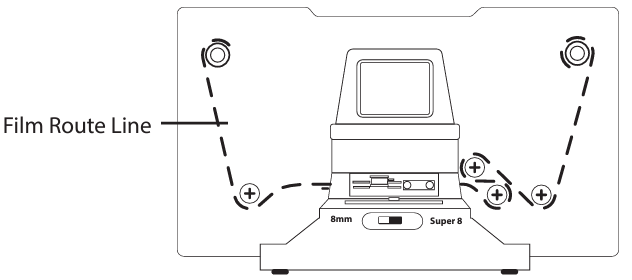
Set the film size switch on the front of the scanner to match your film format of either 8mm or Super8. If it's already set to your film size, try switching it, and then switching it back:
If the film is being pinched when you close the cover of the film tray, it's important to ensure the film is under the white tabs shown in the image below or the film may catch on the cover and stop feeding: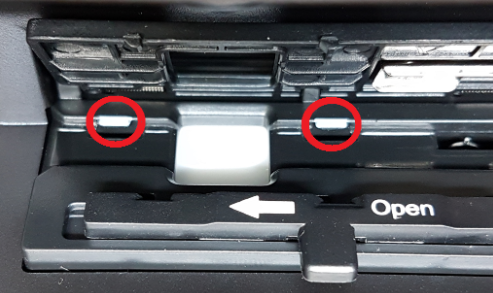
Check the sprocket holes for signs of wear, worn sprocket holes may prevent the scanner from grabbing the holes and advancing the film.
Check for splices in the film. This could result in too much space between sprocket holes for the feed arm.