If your SD card is full, or does not read correctly in your film scanner, formatting it can often resolve the issue. NOTE: Formatting the SD card will erase all data on the card.
-
Insert the SD card in the scanner ensuring it is oriented correctly and you feel the card click into place.
-
On the main menu find the Format option.
- You will be prompted to confirm. Once you do, the SD card memory will be erased and you will be able to scan to it.
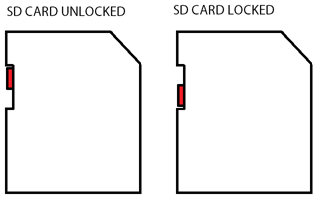
- If you receive an error during formatting or while trying to scan again, check that the SD card is not locked. You will find a small switch as shown in the image below. Ensure it's in the unlocked position.