
There are a number of possible causes for a stylus that skates across records. These steps will help find the cause for any skating you might be experiencing.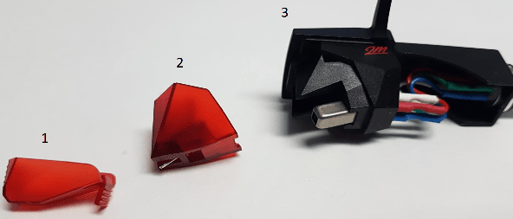
- Stylus Guard
- Stylus
- Cartridge and Headshell
- Confirm the stylus guard is removed.
- Confirm the stylus is not missing from the cartridge.
- The turntable should be on a flat surface, an unlevel surface can cause the stylus to swing or track out of the grooves.
- Check the stylus for dust or debris that can build up over time.
- The anti-skate setting should match the tracking weight of the tonearm, if not it can cause skipping.
- When you first balance the tonearm, the anti-skate setting should be 0. If you rebalance the tonearm, set anti-skate back to 0 before starting.
- Check the records for dust or debris that may be causing the stylus to jump from the groove.
- Try different records, it can be difficult to detect scratches in records that could cause skipping.
If your turntable is still skipping after this, please reach out to our Customer Experience team directly. We would love the opportunity to get you back to enjoying your records again!