
It can be frustrating to set up your turntable only to have nothing come out of it. These steps will be sure to get you listening to your albums in no time!
- Confirm the turntable is connected to external speakers, Fluance turntables do not have built-in speakers
- If you have passive speakers like our SX6, XL8S, and HFS models, you will need an amplifier. A built-in or external preamp will not power these speakers, a stereo or home theater amplifier/receiver would be required.
- Confirm your turntable power adapter is connected to both the back of the turntable and a known working power outlet.
- If your speakers or amplifier don't have a preamp, make sure the preamp switch is in the LINE position (if applicable).
- If your turntable has no internal preamp, ensure the external preamp is powered on and all RCA connections and grounding cables are secure.
- Confirm your speakers or amplifier are powered on.
- If the stylus protector(1) is still on the stylus(2), remove it before playback. Ensure the stylus does not come off with it.
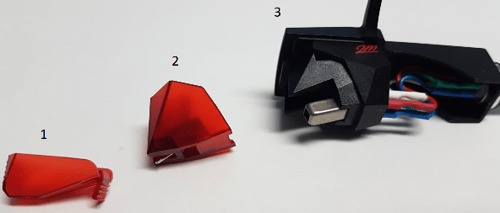
- VIDEO: How to Install or Remove a Stylus Guard/Cover
- Check your tonearm balance, without the correct tracking weight, the stylus will not track in the grooves of the record.
- Remove the headshell and reinsert it. Ensure the locking nut is tight.
- Test your setup with a different set of RCA cables. They should be inserted firmly into the RCA connections of your turntable.
- When the tonearm is lowered, ensure it's not touching the cueing lever bridge. If it is, you can adjust as shown HERE.