
CHOOSING AN AMPLIFIER OR HOME THEATER RECEIVER
All passive speakers require an external amplifier to provide power to both deliver the audio signal and power to the speakers. They cannot be connected directly to your tv or turntable and are connected to the receiver using speaker wire.
WHAT YOU WILL NEED:
-
Speakers
-
Speaker wire (minimum 18 AWG)
-
Wire strippers
-
A/V home theater receiver or amplifier
HOW TO CHOOSE AN AMPLIFIER:
There are a number of factors to consider when selecting an amplifier or receiver for your passive speakers. The most important of these specifications are listed below.
POWER OUTPUT:
How many watts of power will the amplifier feed into the speakers.
Your speakers have a power handling specification, the amplifier should be able to provide power within that range.
Be aware that some amplifiers have output specifications that depend on the number of speakers connected. The more speakers connected, the less power each speaker gets.
CHANNELS:
You will need to decide if you are going to use the amplifier for surround sound or two channel stereo.
They will be advertised with a number like 5.1, 7.1 etc.
The first digit is the number of surround channels, the 2nd digit is how many subwoofer channels. For example, 2.0 is a stereo amplifier that will support up two speakers, 7.2 can have 7 surround speakers and two subwoofers.
CONNECTIONS:
Amplifiers and receivers come with endless options for connectivity.
Some include built in streaming service functions, Bluetooth wireless audio, HDMI, Optical, RCA, and Phono which has a built-in preamp for connecting a turntable.
Ultimately it is up to you to decide on these options!
FIRST TIME SET UP
The break-in period for our speakers is a minimum 10-12 hours of playingtime at normal listening volumes.
After this period the drivers will have had enough movement to perform at their peak level.
SPEAKER PLACEMENT
Speaker placement is the most important part of any Home Theater setup. The proper placement will optimize surround sound and performance of your Fluance speaker system.
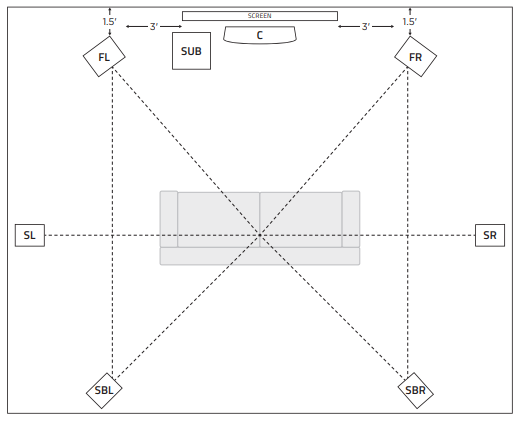
Front Left & Right Speakers (FL/FR):
Place your front speakers 3 feet away from the TV on each side rotated at 22°-30° towards the main seating position, for optimal listening.
Center Channel Speaker (C):
Place your center channel speaker center with your TV. Above or below the TV but more importantly at ear level.
Surround Left & Right Speakers (SL/SR):
Place the surround left & surround right speakers between 90° to 110° directly to the sides of your seating position two feet or higher from the ground.
Surround Back Left & Right Speakers (SBL/SBR):
Mount the back left and right surround sound speakers behind the seating position at ear level in line with the front speakers 135° to 150° towards the main seating position.
Subwoofer (SUB):
The location and angle of the subwoofer is not important as it will radiate sound evenly throughout the room. Do not place in a corner or it will create muddy undesirable bass.
WIRING YOUR SPEAKERS
We recommend using a minimum AWG (American Wire Gauge) of 18 gauge. It is important to measure how much wire you will need before cutting.
Currently we sell 12 gauge speaker wire in 50' lengths: 50' 12ga Speaker Wire
Our speakers are also compatible with banana plugs which are available here: Premium Banana Plug Speaker Wire Connectors
To connect the speaker wire to your speakers, follow these steps:
- Measure how much wire is needed for each speaker.
- Using wire cutters, cut the wire into the lengths you'll need.
- Using wire strippers, strip approximately 1/2"-1" (1-2cm of isulation) from each end of the wire.
- Turn the binding post cap counter clockwise until you can see the hole in the post.
- You can now insert your speaker wire, either through the hole in the binding post, or the cap, feeding it out the hole in the post. Take note of which side of the wire is connected to the positive (red) post, and negative (black) post. Follow these same steps to connect your wire to banana plugs.
- Insert the speaker wire into your amplifier speaker outputs. ensure you connect the each side of the wire to the same connection as the speakers (positive to positive/negative to negative).
BI-AMPING/BI-WIRING
Fluance passive floorstanding speakers are compatible with bi-amping and bi-wiring. This gives you the option to connect the speaker to two amplifiers that are linked, or two channels on your receiver for more power. Your amplifier(s) must be compatible with these functions to take advantage of them.
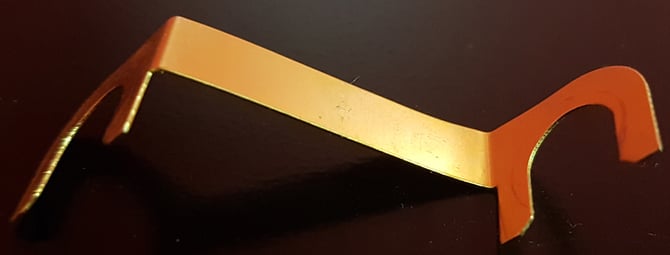
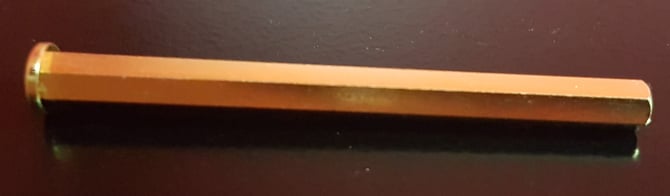
To bi-amp or bi-wire your speakers, you must remove the bridge plates or bridge pins joining the top and bottom binding posts. If these are missing and you are not bi-amping, some of the drivers will not work until they are replaced.
Bridge plate
Bridge pin
CROSSOVER SETTINGS
When you set the crossover settings on the receiver they should be set no lower than the crossover specifications on the product page.
The example below is for the SX6 Elite Bookshelf Surround Sound Speakers.

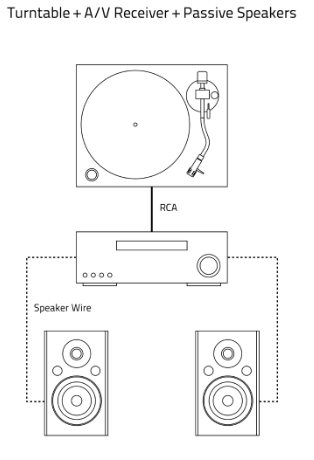
Connecting your turntable to your passive speakers is quick and easy!
You will need an amplifier or receiver to connect speakers such as the Signature Series Bookshelf Speakers (HFS), Reference Series Bookshelf Speakers (XL8S), and Elite Series Bookshelf Speakers (SX6)
- Turn off the amplifier.
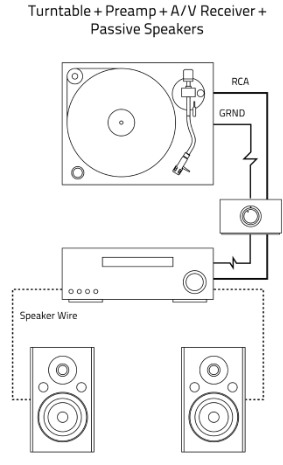
- Connect one side of your RCA cables to an input on the back of the amplifier. If you choose phono, be sure to bypass any built-in preamp if your turntable has one.
- Fluance RT80 an RT81 models have a preamp switch that should be set to Phono in this case when using a phono input, or external preamp.
- External preamp: Set the preamp switch to LINE. Connect the other side of that RCA cable to the output on the preamp. Connect another set of RCA cables from the preamp input, to the outputs on the back of the turntable.
- No preamp/Built-in preamp: Connect the other side of the RCA cable to outputs on the back of the turntable.
- Loosen the ground terminal on the back of the turntable and slide the ground cable spade connector under the washers.
- Connect the other end of the ground wire to the ground terminal on the preamp,
When using the turntable, all audio effects should be disabled and the sound should play in stereo as surround sound and audio effects may cause unexpected audio quality issues while using a turntable
Below is a diagram of a typical setup using an external preamp such as the Fluance PA10. External preamps will almost always sound better than their built-in counterparts as they have been developed with top performance in mind resulting in higher quality audio.
CONNECTING YOUR SUBWOOFER
- Attach the Subwoofer Cable to the LFE/LOW Level Input on the back of the Subwoofer.
- Attach the same Subwoofer Cable to the Subwoofer Output of your home theater receiver or powered speaker.
- Connect the Power Adapter to the wall outlet. Set the Power Switch to either ON or AUTO.
- Vintage receivers may not have an Sub Out, or LFE connection. In this case, you can use speaker wire to connect the subwoofer to a channel on the receiver and using the High Level In speaker wire posts on the subwoofer.
POWER SETTINGS
ON - the subwoofer is always on and receiving a signal.
AUTO - the subwoofer requires a minimum signal voltage to activate, if you find the subwoofer is delayed before it engages, try the ON setting, or increase the source volume.
OFF - the subwoofer is powered off and not receiving a signal.
SETTING THE CROSSOVER
The Volume/Crossover settings can be adjusted with the Volume/Crossover knob located on the back panel of the Subwoofer. The Crossover setting changes the cut off frequency for the Subwoofer.
Our recommendation is to start at 80Hz crossover and adjust as needed for what sounds best for you.
Fluance powered speakers such as the Ai41, Ai61, and Ai81 have a low frequency filter that is enabled when a subwoofer cable is connected to the subwoofer output. This filter is active even when the subwoofer is off and will cause reduced bass response when the subwoofer is not turned on.
PHASE
When the subwoofer is out of phase, it means the driver on the subwoofer is moving inward, while the other speakers are moving out. This can cancel out frequencies and result in poor audio performance.
While it's hard to tell if they are in our out of phase, you will want to select the setting that sounds best.
TROUBLESHOOTING
No Power
- Ensure the subwoofer is plugged into a known good power source.
- Confirm that the subwoofer power switch is set to ON or AUTO.
- Ensure the Power LED is lit.
No Audio
- Ensure the subwoofer is plugged into a known good power source.
- Disconnect the subwoofer cable from the receiver/speakers, and subwoofer. Reconnect them.
- Try a different subwoofer cable.
- Confirm the subwoofer power switch is set to ON or AUTO.
- If set to AUTO, ensure the signal is enough to trigger the subwoofer to turn on. You may need to increase the volume.
- Confirm the receiver is set to a surround setting and the subwoofer setting is turned on. Refer to your receiver manual for more information.
Distortion
- Ensure the subwoofer is connected to the LFE/Subwoofer Out connection on your speakers/receiver.
- Remove the grill and verify there is no damage to the driver.
- Lower the volume on the subwoofer.
- Check for any bass boost or subwoofer volume settings on your receiver/speakers and disable them.
- Lower the volume of the receiver/speakers.