
If you are experiencing difficulties with your remote control, we would recommend the following troubleshooting.
-
Confirm there are new batteries in the remote. If the batteries are weak in the remote, the signal may be too weak to transmit through the device.
-
The Transmitter should be connected to your Cable Box, DVD Player, Blu-Ray Player, or other source device. The IR Extender should be connected to the Transmitter and placed in front of the source device where the IR sensor is located (usually behind a clear plastic window).
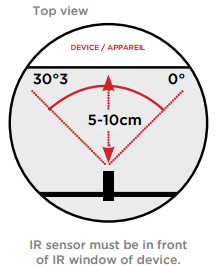
-
The receiver should be positioned so the IR sensor on the front is visible from where you will be watching.
-
IR transmits differently than the Audio/Video signal which means that the distance between the transmitter and receiver may need to be reduced in order for the IR extender to work.
-
Another means of testing the IR remote is to use a cell phone or any other digital camera. IR signals are invisible to the human eye but the cell phone camera will pick it up as a faint light. Simply aim the remote at your digital camera and press a button on the remote, you should see the IR light flash through the digital camera. If you don't have an LED on the front of the remote, you may have an RF Remote which should work anywhere without an extender.

-
With so many devices in the market, we are unable to test the IR extender with every cable box, Blu Ray etc. When we designed this product we used industry standards for IR signals and therefore our products are compatible with the majority of source devices on the market.