
What You Need:
- A replacement stylus compatible with the AT3600L cartridge: Audio-Technica ATN3600L
Steps to Replace the Stylus:
- Turn Off the Turntable
- If your turntable is connected to power, turn it off and unplug it to avoid accidental movement.
- Remove the Old Stylus
- Using the tonearm lock, secure the tonearm.
- Gently hold the cartridge body with one hand.
- With your other hand, grasp the stylus assembly (the plastic portion at the bottom of the cartridge).
- Pull the stylus downward and then slightly forward as it detaches.
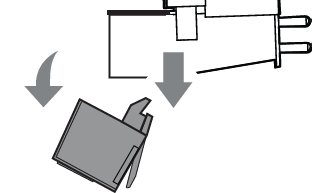
- Install the New Stylus
- Align the new stylus with the cartridge slot.
- Insert it by pushing upward and slightly backward until it clicks into place.
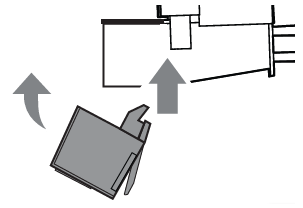
- Check the Alignment
- Ensure the stylus is seated properly and not tilted or loose.
- Test the Turntable
- Gently place the tonearm back on a record to check if the new stylus tracks correctly.
- Extra Tips:
- Avoid touching the needle (stylus tip) directly to prevent damage.
- Always use a genuine Audio-Technica stylus to ensure proper sound quality.